Contents
Obsah
Introduction
TSP Solver works with the Traveling Salesman Problem (TSP): search for a very short route that visits all points exactly once and returns to the start. It is useful for logistics, route planning, PCB drilling, CNC/laser workflows, robotics, and drone path planning (2D and 3D).
The app includes LKH, Robopol Refined, and a quality-focused hybrid method, and supports both straight-line (air) distance and road distance based on real road networks.
Úvod
TSP Solver pracuje s problémom obchodného cestujúceho (TSP): hľadá čo najkratšiu trasu, ktorá navštívi všetky body presne raz a vráti sa na začiatok. Hodí sa pre logistiku, plánovanie trás, vŕtanie DPS, CNC/laser, robotiku aj plánovanie trás pre drony (2D aj 3D).
Aplikácia obsahuje LKH, Robopol Refined a hybridnú metódu zameranú na kvalitu a podporuje výpočet vzdušnou čiarou aj cestné vzdialenosti podľa reálnej cestnej siete.
Quick start
- Choose distance type: Air (points) or Road (addresses).
- Add points by clicking on the canvas, or import points from a
.txtfile. - Select a method and speed/quality profile suitable for the job.
- Click Calculate to compute and draw the route.
- Export points / image / SVG or save the project as
.json.
Rýchly štart
- Zvoľ typ vzdialenosti: Air (body) alebo Road (adresy).
- Vytvor body kliknutím na plátno alebo importuj body z
.txtsúboru. - Vyber metódu a profil rýchlosti/kvality vhodný pre danú úlohu.
- Klikni Calculate – vypočíta a vykreslí trasu.
- Exportuj body/obrázok/SVG alebo ulož projekt ako
.json.
Program overview
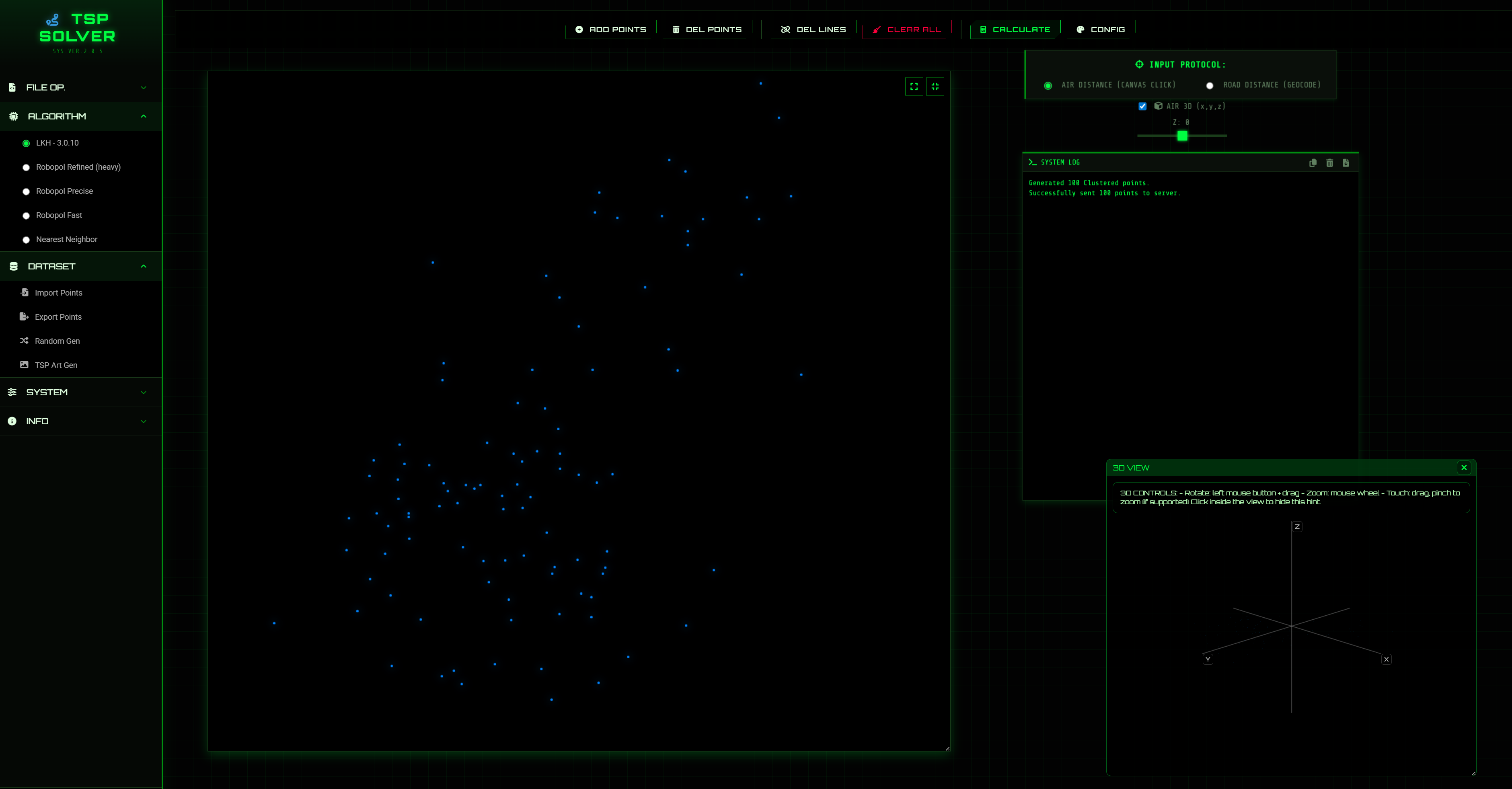
- Program menu
- Function buttons
- Canvas – input/output (points + route)
- Text output – route details and logs
The Canvas and Route Details panel are resizable. On desktop you can also move these panels.
Prehľad programu
- Programové menu
- Funkčné tlačidlá
- Plátno – vstup/výstup (body + trasa)
- Textový výstup – detaily trasy a logy
Plátno aj panel Route Details sú nastaviteľné (resize). Na desktope ich vieš aj presúvať.
Layout & Fullscreen
On desktop, Canvas and Route Details (System Log) behave like floating panels: you can move and resize them to build your preferred workspace. The app remembers the layout.
Move panels
- Canvas: drag by the border/edge (cursor changes to “move”). Double‑click the edge to reset position.
- Route Details: drag using the grip bar at the top (appears on hover).
Resize panels
- Use the browser resize handle (bottom‑right) on both Canvas and Route Details.
- For huge datasets, enable Skip Drawing in Visual Config to keep the UI responsive.
Fullscreen Canvas + hamburger menu
- Click Fullscreen (expand icon) in the top‑right corner of the Canvas.
- Canvas fills the entire screen and the side panels are hidden to maximize workspace.
- A hamburger menu appears — use it to access File/Method/Data/Edit/Settings/Help/License while fullscreen.
- Exit fullscreen by clicking the fullscreen button again (compress icon).
- Use Reset View to restore default canvas size/position (also exits fullscreen if active).
On mobile/small screens the app switches to a stacked layout; dragging/resizing is primarily for desktop use.
Rozloženie & Fullscreen
Na desktope sa Canvas a Route Details (System Log) správajú ako „plávajúce“ panely: vieš ich presúvať a meniť veľkosť, aby si si poskladal vlastné pracovné rozloženie. Aplikácia si rozloženie pamätá.
Presúvanie panelov
- Canvas: presúvaj chytením okraja/rámiku (kurzor sa zmení na „move“). Dvojklik na okraj resetuje pozíciu.
- Route Details: presúvaj cez úchyt (grip bar) hore (zobrazí sa po nabehnutí myšou).
Zmena veľkosti
- Veľkosť Canvas aj Route Details zmeníš cez resize úchyt (spodný pravý roh).
- Pri extrémne veľkých datasetoch zapni v Visual Config Skip Drawing, aby bolo UI plynulé.
Fullscreen Canvas + hamburger menu
- Klikni Fullscreen (ikona expand) v pravom hornom rohu Canvas.
- Canvas sa prepne na celú obrazovku a ostatné panely sa skryjú, aby bolo maximum miesta.
- Zobrazí sa hamburger menu — cez neho sa dostaneš k File/Method/Data/Edit/Settings/Help/License aj vo fullscreen.
- Fullscreen vypneš kliknutím na fullscreen tlačidlo znova (ikona compress).
- Reset View vráti defaultnú veľkosť/pozíciu Canvas (a vypne fullscreen, ak je aktívny).
Na mobile/menších obrazovkách sa rozloženie automaticky preklopí do „stack“ režimu; presúvanie/resize je primárne pre desktop.
AIR 3D (x, y, z) + 3D view
TSP Solver supports 3D points in Air Distance mode: each point can have coordinates
x, y, z (where z represents height). When 3D is enabled,
the solver computes distances in 3D and the app opens an interactive 3D VIEW window.
Enable 3D mode
- Select Air distance type.
- Enable AIR 3D (x,y,z) (checkbox).
- Use the Z slider to set the current Z value for newly added points.
-1000 to 1000 (step 1).
3D VIEW window
- Draggable: drag by the header bar.
- Resizable: resize the window corner/edge.
- Close button: hides the viewer (does not disable 3D mode).
- Reopen: a SHOW 3D VIEW button appears in the AIR 3D controls if the viewer is hidden.
- Controls hint: rotate (drag), zoom (mouse wheel), touch drag/pinch (if supported).
Import / Export (3D)
x y(2D) orx y z(3D) per line are supported.-
Numbered lines are supported only with explicit delimiters (examples:
1) x y z,1: x y,1, x y). - Export automatically includes Z when 3D is enabled (or when any point has non‑zero Z).
AIR 3D (x, y, z) + 3D view
TSP Solver podporuje 3D body v režime Air Distance: každý bod má súradnice
x, y, z (kde z je výška). Keď zapneš 3D,
vzdialenosti sa počítajú v 3D a otvorí sa interaktívne okno 3D VIEW.
Ako zapnúť 3D režim
- Zvoľ Air typ vzdialenosti.
- Zapni AIR 3D (x,y,z) (checkbox).
- Nastav Z slider – určuje aktuálne Z pre novo pridávané body.
-1000 do 1000 (krok 1).
Okno 3D VIEW
- Presúvateľné: ťahaním za horný header.
- Resizable: zmeníš veľkosť potiahnutím rohu/okraja.
- Close: iba skryje 3D viewer (3D režim ostáva zapnutý).
- Znovuotvorenie: po skrytí sa v AIR 3D ovládaní zobrazí tlačidlo SHOW 3D VIEW.
- Ovládanie: rotácia ťahaním, zoom kolieskom, na dotyk drag/pinch (ak je podporované).
Import / Export (3D)
- Podporované riadky
x y(2D) alebox y z(3D). -
Číslovanie riadkov funguje len s explicitným oddeľovačom (príklady:
1) x y z,1: x y,1, x y). - Export automaticky pridá Z, keď je zapnutý 3D režim (alebo keď má niektorý bod nenulové Z).
Algorithms
LKH‑3.0.10
An established high-quality option with support for AIR, ROAD, and multi-vehicle workflows.
Practical tip: For AIR routes, try different available
CANDIDATE_SET_TYPE values. LKH can return a different route for each one, and the best
choice depends on the point layout.
Distance type: EUC_2D / EUC_3D rounds each Euclidean edge distance to
whole units. EXACT_2D / EXACT_3D uses finer distance precision, so choose EXACT when an
accurate total distance is important.
LKH + Robopol Refined
A premium quality-focused method for demanding AIR routes. It prioritizes final route quality and can require more calculation time.
Robopol Refined
RoboPol's proprietary optimizer with Fast, Balanced, and Heavy profiles. Fast favors response time, Balanced is recommended for general work, and Heavy favors maximum route quality.
Algoritmy
LKH‑3.0.10
Overená metóda s vysokou kvalitou a podporou režimov AIR, ROAD aj multi-vehicle.
Praktický tip: Pri AIR trasách vyskúšaj rôzne dostupné hodnoty
CANDIDATE_SET_TYPE. LKH môže pre každú z nich vrátiť inú trasu a najlepšia voľba závisí
od rozloženia bodov.
Typ vzdialenosti: EUC_2D / EUC_3D zaokrúhľuje dĺžku každej euklidovskej
hrany na celé jednotky. EXACT_2D / EXACT_3D používa jemnejšiu presnosť vzdialeností, preto
zvoľ EXACT, keď je dôležitá presná celková vzdialenosť.
LKH + Robopol Refined
Prémiová metóda zameraná na kvalitu pre náročné AIR trasy. Uprednostňuje výslednú kvalitu trasy a môže vyžadovať dlhší čas výpočtu.
Robopol Refined
Vlastný optimalizátor RoboPol s profilmi Fast, Balanced a Heavy. Fast uprednostňuje rýchlosť, Balanced je odporúčaný na bežnú prácu a Heavy uprednostňuje maximálnu kvalitu trasy.
Performance
- Profiles: Fast prioritizes response time, Balanced provides the default trade-off, and Heavy prioritizes quality.
- Scaling: calculation time depends on point count, geometry, selected method, profile, and hardware.
- Quality: no single profile is best for every dataset; compare results when the route is business-critical.
- 3D support: 2D and 3D (x, y, z) with interactive visualization.
- Road distance: computes routes on real road networks, exportable to Google Maps.
Výkonnosť
- Profily: Fast uprednostňuje rýchlosť, Balanced ponúka predvolený kompromis a Heavy uprednostňuje kvalitu.
- Škálovanie: čas závisí od počtu bodov, geometrie, zvolenej metódy, profilu a hardvéru.
- Kvalita: žiadny profil nie je najlepší pre každý dataset; pri dôležitých trasách výsledky porovnaj.
- 3D podpora: 2D aj 3D (x, y, z) s interaktívnou vizualizáciou.
- Cestné vzdialenosti: trasy po reálnej cestnej sieti s exportom do Google Maps.
Settings (recommended)
Method selection
- Fast response: Robopol Refined with the Fast profile.
- General work: Robopol Refined with the Balanced profile.
- Maximum AIR quality: Heavy profile or LKH + Robopol Refined.
- ROAD or multi-vehicle: LKH‑3.0.10.
Profile guidance
Use the supplied profiles before changing individual values. They provide tested speed and quality levels without requiring manual tuning.
Advanced overrides are intended for experienced users. Increasing a value can increase runtime, CPU use, or memory and does not guarantee a better route on every dataset.
Nastavenia (odporúčania)
Výber metódy
- Rýchly výsledok: Robopol Refined s profilom Fast.
- Bežná práca: Robopol Refined s profilom Balanced.
- Maximálna AIR kvalita: profil Heavy alebo LKH + Robopol Refined.
- ROAD alebo multi-vehicle: LKH‑3.0.10.
Odporúčanie k profilom
Pred zmenou jednotlivých hodnôt použi pripravené profily. Poskytujú otestované úrovne rýchlosti a kvality bez potreby ručného ladenia.
Pokročilé úpravy sú určené skúseným používateľom. Zvýšenie hodnoty môže predĺžiť čas, zvýšiť využitie CPU alebo pamäte a negarantuje lepšiu trasu na každom datasete.
File operations
New Project
Resets to the initial state (clears canvas/output, keeps settings).
Save As
Saves the project as .json (air: tsp_air_data.json, road: tsp_road_data.json).
Open Project
Loads a saved .json project created by TSP Solver.
Import / Export Image
Import a background template and export the current visualization as an image.
Export SVG
Exports route + points as scalable vector graphics (.svg).
Súbory (File operations)
New Project
Reset na úvodný stav (vymaže plátno/výstup, ponechá nastavenia).
Save As
Uloží projekt ako .json (air: tsp_air_data.json, road: tsp_road_data.json).
Open Project
Načíta uložený .json projekt vytvorený v TSP Solver.
Import / Export Image
Import obrázka ako podklad a export aktuálnej vizualizácie do obrázka.
Export SVG
Export trasy + bodov do vektorového formátu (.svg).
Import / Export data
Import points
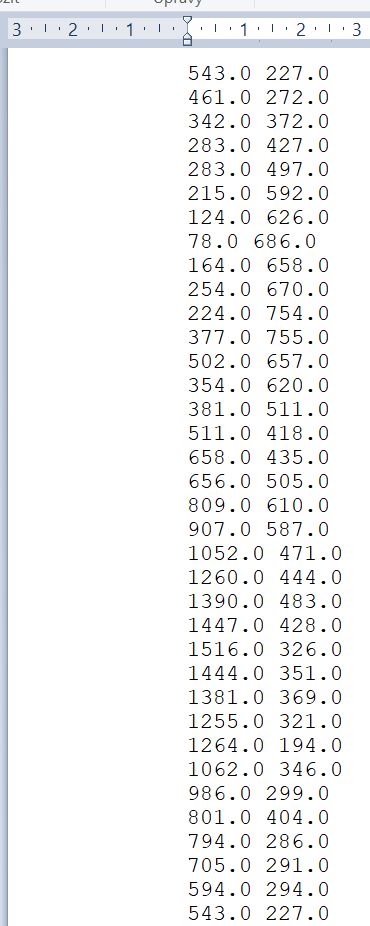
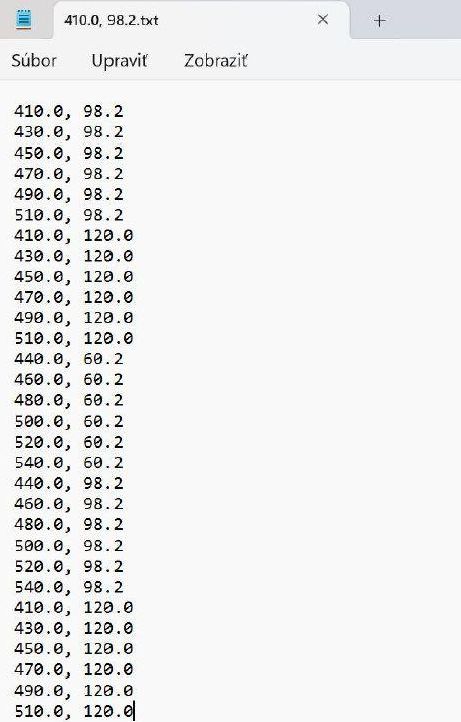
Accepted coordinate formats (AIR 2D/3D):
x y(2D) orx y z(3D), separators: space / comma / semicolonx, yorx, y, zx; yorx; y; zn) x y/n) x y z(numbered, delimiter))n: x y/n: x y z(numbered, delimiter:)n, x y/n, x y z(numbered, delimiter,)
Numbering is recognized only when it has an explicit delimiter (), :, ,).
This prevents breaking valid 3D files where the first coordinate is an integer.
The first row is treated as the start point. If last equals first, the input is treated as a closed loop.
Decimals must use dot (.), not comma.
Export points
Exports route points to .txt. The exporter preserves your coordinate delimiter
(space/comma/semicolon) and numbering style when possible.
- If AIR 3D is enabled (or any point has non‑zero Z), export uses
x y z. - Otherwise export uses
x y.
Multi-vehicle (mTSP) TXT format
When a multi-vehicle route exists, TSP Solver exports a structured .txt file (for machines/tools)
with explicit sections. The format starts with a header and then contains POINTS and ROUTES.
# TSP_SOLVER_TXT 1# mode: airor# mode: road# depot: 1,# vehicles: k,# objective: MINSUM|MINMAX|MINMAX_SIZEPOINTSsection:id x y [z](AIR) orid lat lon "address"(ROAD)ROUTESsection:V <vehicle_id> cost=<cost> stops: id id id ...
IDs in the structured export are 1..n (by point order in the file). Routes reference these IDs.
Random points
Generates random points (for performance testing) and then calculates a route.
Import / Export dát
Import bodov
Podporované formáty súradníc (AIR 2D/3D):
x y(2D) alebox y z(3D), oddeľovače: medzera / čiarka / bodkočiarkax, yalebox, y, zx; yalebox; y; zn) x y/n) x y z(číslované, oddeľovač))n: x y/n: x y z(číslované, oddeľovač:)n, x y/n, x y z(číslované, oddeľovač,)
Číslovanie sa rozpozná iba vtedy, keď má explicitný oddeľovač (), :, ,).
Tým sa zabráni tomu, aby sa platný 3D súbor s celočíselným x mylne bral ako „poradové číslo“.
Prvý riadok je štart. Ak posledný bod = prvý bod, dáta sa berú ako uzavretý okruh.
Desatinný oddeľovač musí byť bodka (.), nie čiarka.
Export bodov
Exportuje body trasy do .txt. Export sa snaží zachovať oddeľovač súradníc
(medzera/čiarka/bodkočiarka) aj štýl číslovania, keď je to možné.
- Ak je zapnuté AIR 3D (alebo má niektorý bod nenulové Z), exportuje
x y z. - Inak exportuje
x y.
TXT formát pre multi-vehicle (mTSP)
Keď existuje multi-vehicle trasa, TSP Solver exportuje štruktúrovaný .txt súbor (pre stroje/nástroje)
so sekciami. Formát začína hlavičkou a potom obsahuje POINTS a ROUTES.
# TSP_SOLVER_TXT 1# mode: airalebo# mode: road# depot: 1,# vehicles: k,# objective: MINSUM|MINMAX|MINMAX_SIZE- Sekcia
POINTS:id x y [z](AIR) aleboid lat lon "adresa"(ROAD) - Sekcia
ROUTES:V <vehicle_id> cost=<cost> stops: id id id ...
ID v štruktúrovanom exporte sú 1..n (podľa poradia bodov v súbore). Trasy referencujú tieto ID.
Náhodné body
Vygeneruje náhodné body (na test výkonu) a následne vypočíta trasu.
Visual config & Method config
Visual config
- Canvas colors: Background, Node, Link
- Sizes: Node size, Link width
- Skip Drawing (large datasets): disables rendering of points and route on the canvas
- Page colors (UI theme): Page BG, Sidebar, Panels, Accent, Accent Dark, Text, Borders, Inputs BG, etc.
- Reset Page Colors: restores default TSP Solver theme colors
Method config
Method Config provides speed, quality, and resource controls. Start with a supplied profile and change individual values only when a measured business case requires it.
Robopol Refined controls
Only predictable search-effort controls are exposed. Sensitive internal parameters are managed by the selected profile because their interactions are non-linear; tuning them independently can reduce useful optimization work or worsen route quality.
- Profile: loads a complete tested speed/quality preset.
- Runs: sets the number of independent optimization attempts; the best result is retained.
- Search budget per run: sets how much search work each attempt may perform.
- Search breadth: sets how many promising route alternatives are kept concurrently.
- Variants per cycle: sets how many alternatives are evaluated in each search cycle.
- Per-profile values: custom values are stored in the browser separately for Fast, Balanced, and Heavy and restored when returning to that profile.
- Reset current profile values: clears only the custom values of the selected profile and restores its built-in values.
LKH Multi-vehicle (mTSP) settings
TSP Solver supports multi-vehicle routing (mTSP) via LKH-3.0.10 from the Method Config panel. It is intended mainly for AIR 2D and ROAD workflows. Use AIR 3D (x,y,z) carefully and test smaller jobs before large runs.
- Problem type: choose TSP (1 route) or Multi-vehicle (mTSP).
- Vehicles (
vehicles): number of vehicles/salesmen (routes) to split the tour into. - Objective (
mtsp_objective):MINSUM: minimize total sum of all routes (best overall distance/time).MINMAX: minimize the longest single route (fairness by distance/time).MINMAX_SIZE: balance workload by minimizing the maximum number of stops per vehicle (not a direct distance objective).
- Depot index (1..n) (
depot_index): start/end node for all routes (1 = first point).
ROAD note: in Road mode this index refers to the order of successfully geocoded addresses (1 = first). Failed address lines are skipped. - Min points / vehicle (
mtsp_min_size): minimum number of stops per vehicle (excludes depot). Use to prevent 1-vs-99 splits. - Max points / vehicle (
mtsp_max_size): maximum number of stops per vehicle (excludes depot). Use to cap workload. - Road optimize by (
road_objective): choose Distance (km) or Time (sec) for ROAD mode.
LKH-3.0.10 advanced settings
These are expert controls. Keep the supplied defaults for normal work; the application automatically disables or manages options that do not apply to the selected method.
- RUNS and MAX_TRIALS: increase calculation effort and usually increase runtime.
- Other expert options: leave unchanged unless a validated benchmark or support recommendation requires an override.
Note (import/export): multi-vehicle route import/export is not fully implemented yet. You can compute and visualize mTSP routes and read per-vehicle routes in Route Details.
Visual config & Method config
Visual config
- Farby plátna: Background, Node, Link
- Veľkosti: Node size, Link width
- Skip Drawing (veľké datasety): vypne renderovanie bodov a trasy na plátne
- Farby stránky (UI téma): Page BG, Sidebar, Panels, Accent, Accent Dark, Text, Borders, Inputs BG, atď.
- Reset Page Colors: obnoví defaultné TSP Solver farby
Method config
Method Config poskytuje nastavenia rýchlosti, kvality a využitia zdrojov. Začni pripraveným profilom a jednotlivé hodnoty meň iba vtedy, keď to vyžaduje overený praktický prípad.
Ovládanie Robopol Refined
Prístupné sú iba predvídateľné voľby náročnosti hľadania. Citlivé interné parametre spravuje zvolený profil, pretože ich vzájomné pôsobenie nie je lineárne; samostatné ladenie môže obmedziť užitočnú optimalizačnú prácu alebo zhoršiť kvalitu trasy.
- Profil: načíta kompletné otestované nastavenie rýchlosti a kvality.
- Runs: určuje počet nezávislých optimalizačných pokusov; zachová sa najlepší výsledok.
- Search budget per run: určuje množstvo práce pre každý optimalizačný pokus.
- Search breadth: určuje počet perspektívnych alternatív trasy udržiavaných súčasne.
- Variants per cycle: určuje počet alternatív vyhodnotených v jednom cykle hľadania.
- Hodnoty podľa profilu: vlastné hodnoty sa v prehliadači ukladajú osobitne pre Fast, Balanced a Heavy a po návrate k profilu sa obnovia.
- Reset current profile values: vymaže iba vlastné hodnoty zvoleného profilu a obnoví jeho vstavané hodnoty.
LKH Multi-vehicle (mTSP) nastavenia
TSP Solver podporuje multi-vehicle routing (mTSP) cez LKH-3.0.10 v Method Config. Je to určené hlavne pre AIR 2D a ROAD workflow. Pri AIR 3D (x,y,z) najprv otestuj menšie úlohy pred veľkými výpočtami.
- Problem type: zvoľ TSP (1 route) alebo Multi-vehicle (mTSP).
- Vehicles (
vehicles): počet áut/salesmen (koľko trás sa má vytvoriť). - Objective (
mtsp_objective):MINSUM: minimalizuje súčet všetkých trás (najlepšie celkovo).MINMAX: minimalizuje najdlhšiu trasu (férovosť podľa dĺžky/času).MINMAX_SIZE: vyrovnáva workload podľa počtu zastávok (nie je to priamo cieľ na dĺžku).
- Depot index (1..n) (
depot_index): štart/cieľ pre všetky trasy (1 = prvý bod).
ROAD poznámka: v Road režime je to poradie úspešne geokódovaných adries (1 = prvá). Neúspešné riadky sa preskočia. - Min points / vehicle (
mtsp_min_size): minimum bodov na auto (bez depa). - Max points / vehicle (
mtsp_max_size): maximum bodov na auto (bez depa). - Road optimize by (
road_objective): v ROAD režime zvoľ Distance (km) alebo Time (sec).
LKH-3.0.10 advanced nastavenia
Ide o expertné voľby. Pri bežnej práci ponechaj pripravené hodnoty; aplikácia automaticky vypne alebo spravuje voľby, ktoré sa na zvolenú metódu nevzťahujú.
- RUNS a MAX_TRIALS: zvyšujú náročnosť výpočtu a zvyčajne predlžujú čas.
- Ostatné expertné voľby: nemeň, pokiaľ úpravu nevyžaduje overený benchmark alebo odporúčanie podpory.
Actions: Create / Delete / Calculate
Add points
Click on the canvas to add points. Point #1 is used as the start/end.
Delete points
Enable delete mode and click a point to remove it.
Remove lines
Clears the currently drawn route connections.
Clear all
Removes all points, routes and imported background images.
Calculate
Computes the route for the selected method. Requires at least 2 points.
Akcie: Create / Delete / Calculate
Add points
Kliknutím na plátno pridáš body. Bod #1 je štart/cieľ.
Delete points
Zapni delete režim a klikni na bod, ktorý chceš odstrániť.
Remove lines
Vymaže aktuálne vykreslené spojenia trasy.
Clear all
Odstráni všetky body, trasy aj importované obrázky na pozadí.
Calculate
Vypočíta trasu podľa zvolenej metódy. Potrebuje aspoň 2 body.
TSP Art
Create single‑line artworks by converting an image into points and solving TSP on them.
- Dataset → TSP Art Gen
- Select an image and number of points (conversion can take ~30 seconds)
- Adjust colors in System → Visual Config
- For a fast calculation, select LKH-3.0.10 and use CANDIDATE_SET_TYPE = DELAUNAY with RUNS = 1
- Click Calculate
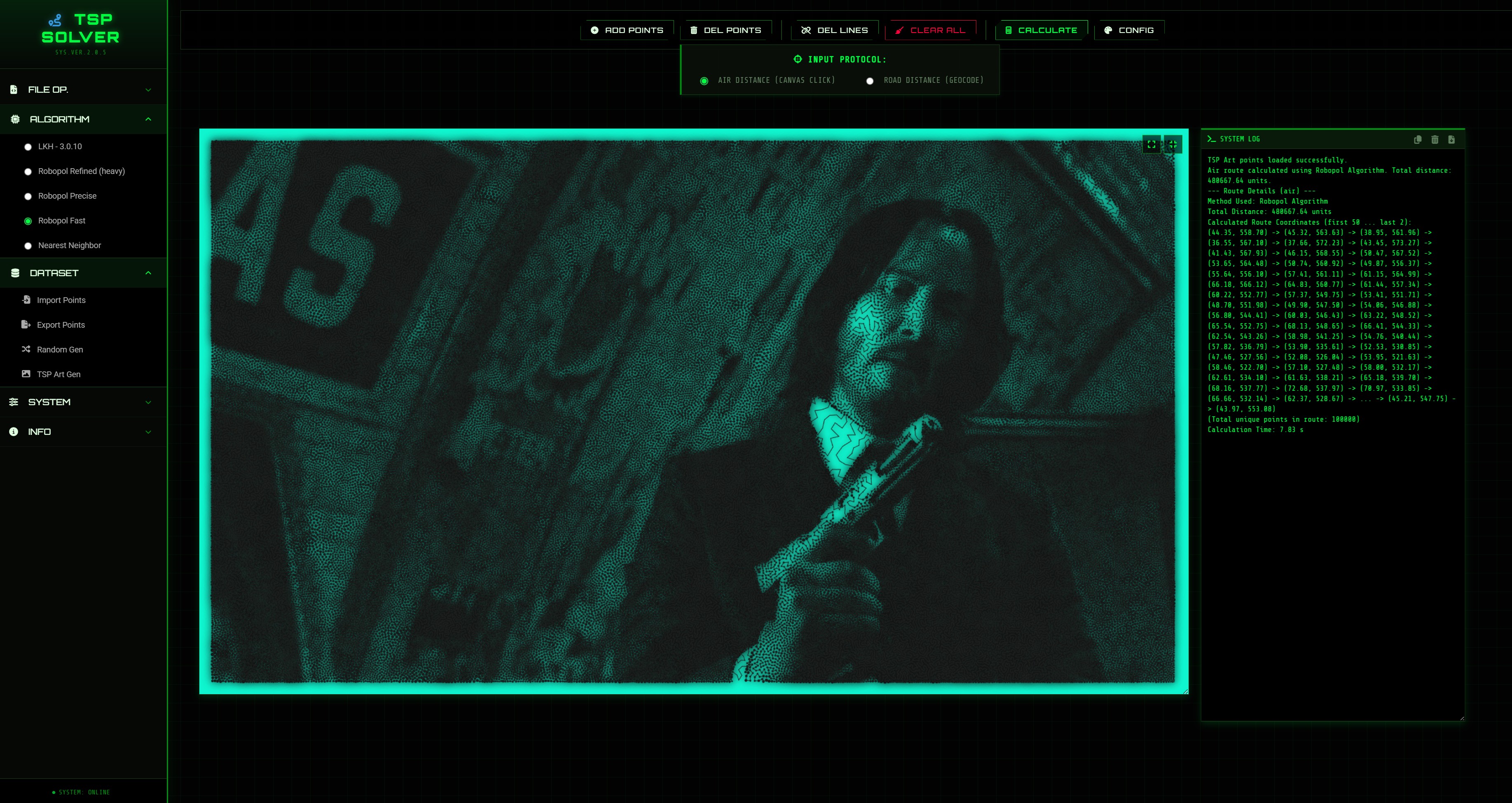
TSP Art
Vytvára jednoťažkové kresby: prevedie obrázok na body a následne vyrieši TSP nad týmito bodmi.
- Dataset → TSP Art Gen
- Vyber obrázok a počet bodov (konverzia môže trvať ~30 sekúnd)
- Nastav farby v System → Visual Config
- Pre rýchly výpočet vyber LKH-3.0.10 a použi CANDIDATE_SET_TYPE = DELAUNAY s RUNS = 1
- Klikni Calculate
Examples
Example 1 – points on an imported image
- Import an image template.
- Add a start point (#1), then add remaining points.
- Adjust colors (Visual Config).
- Select method (Algorithm menu) and Calculate.
- Export the route (image/points/SVG) and Save As project.
Example 2 – import points from TXT
- Prepare a
.txtfile with coordinates. - Dataset → Import Points.
- Select method and Calculate.
- Export points and Save As project.
Screenshots (click to open)
Data formats
Road distance & maps
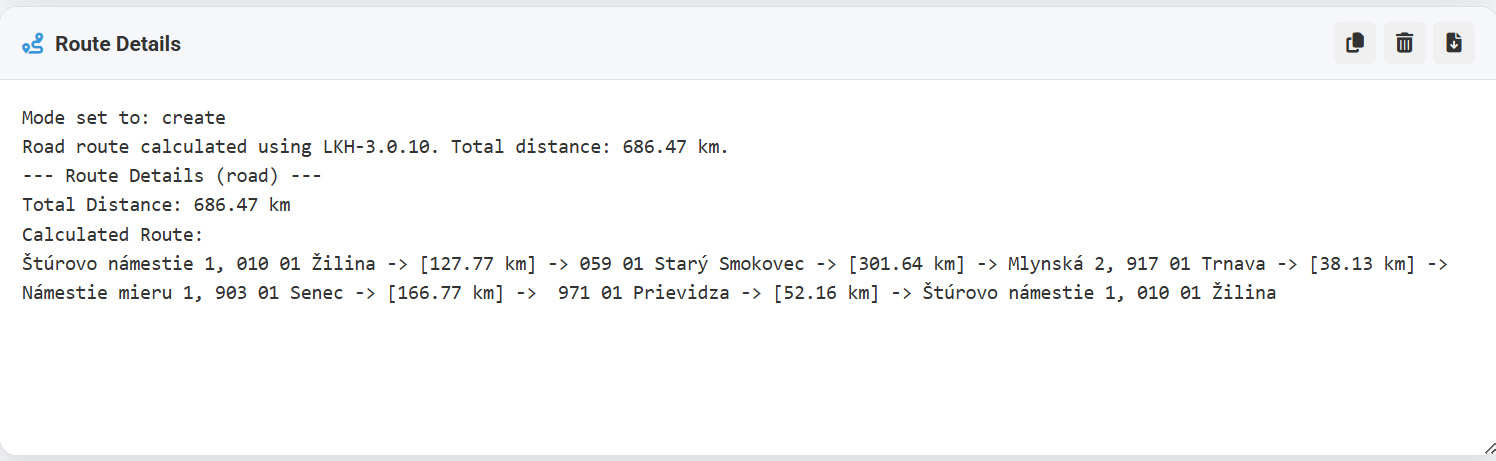
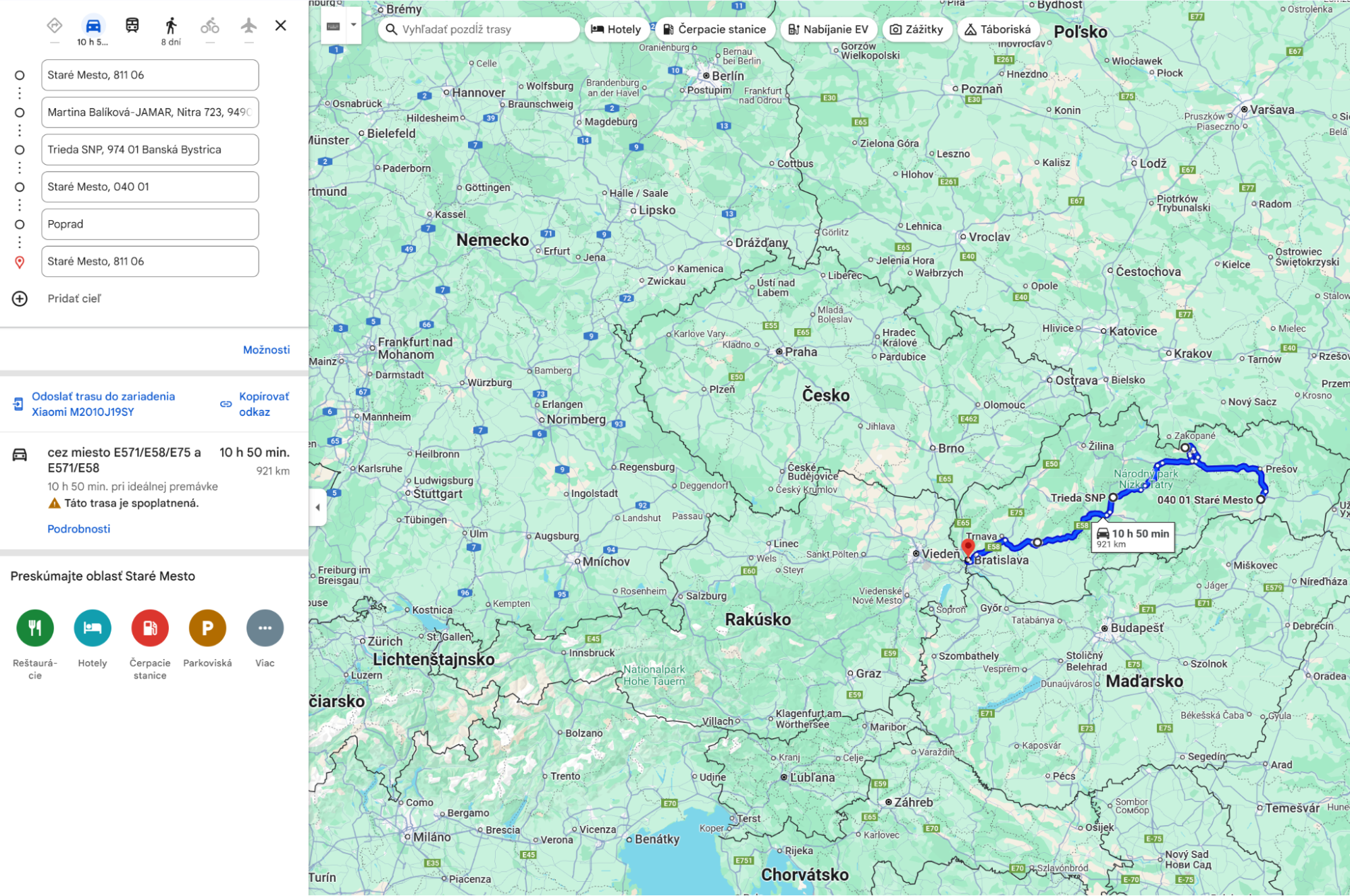

TSP Art
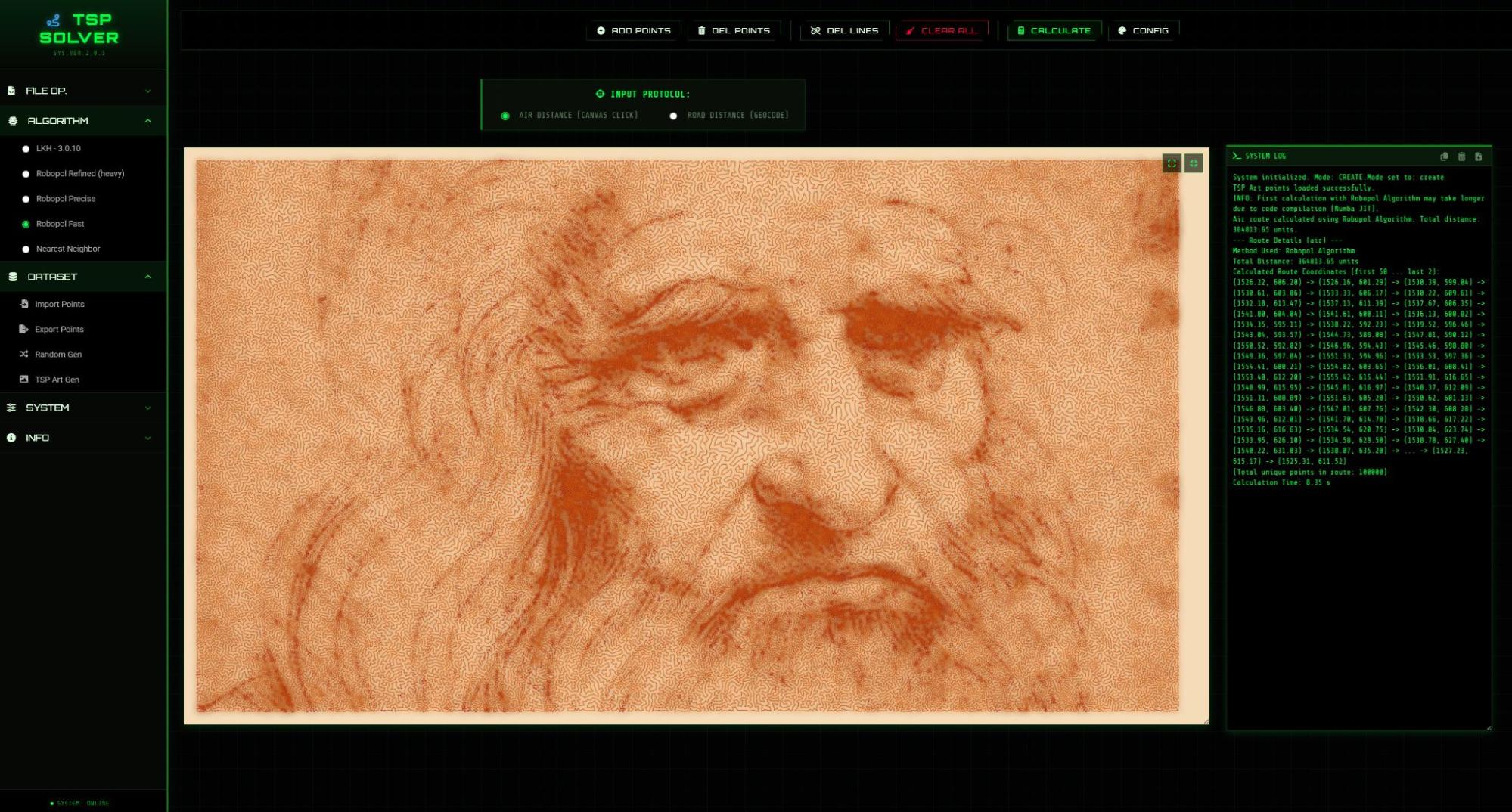
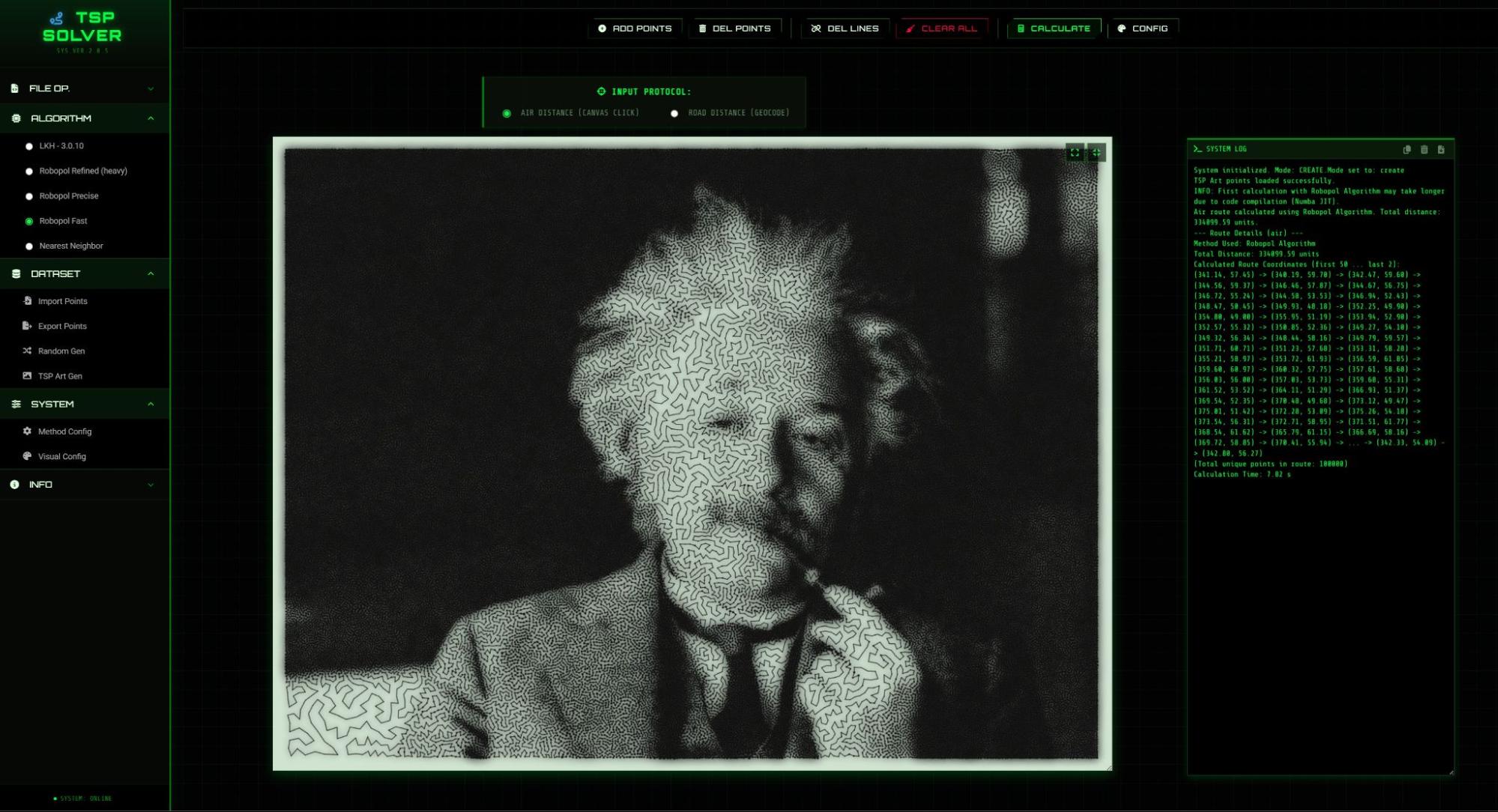
UI examples
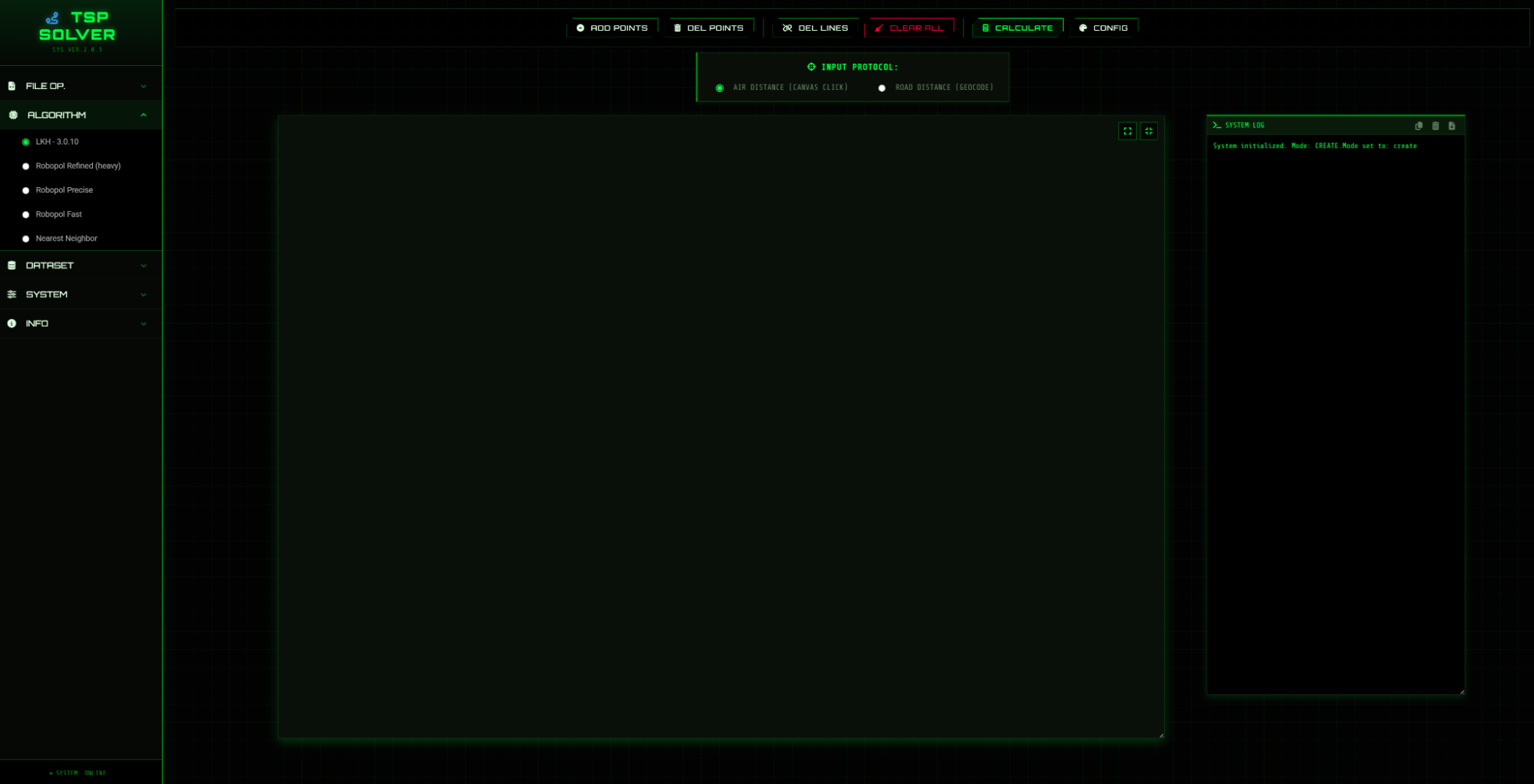
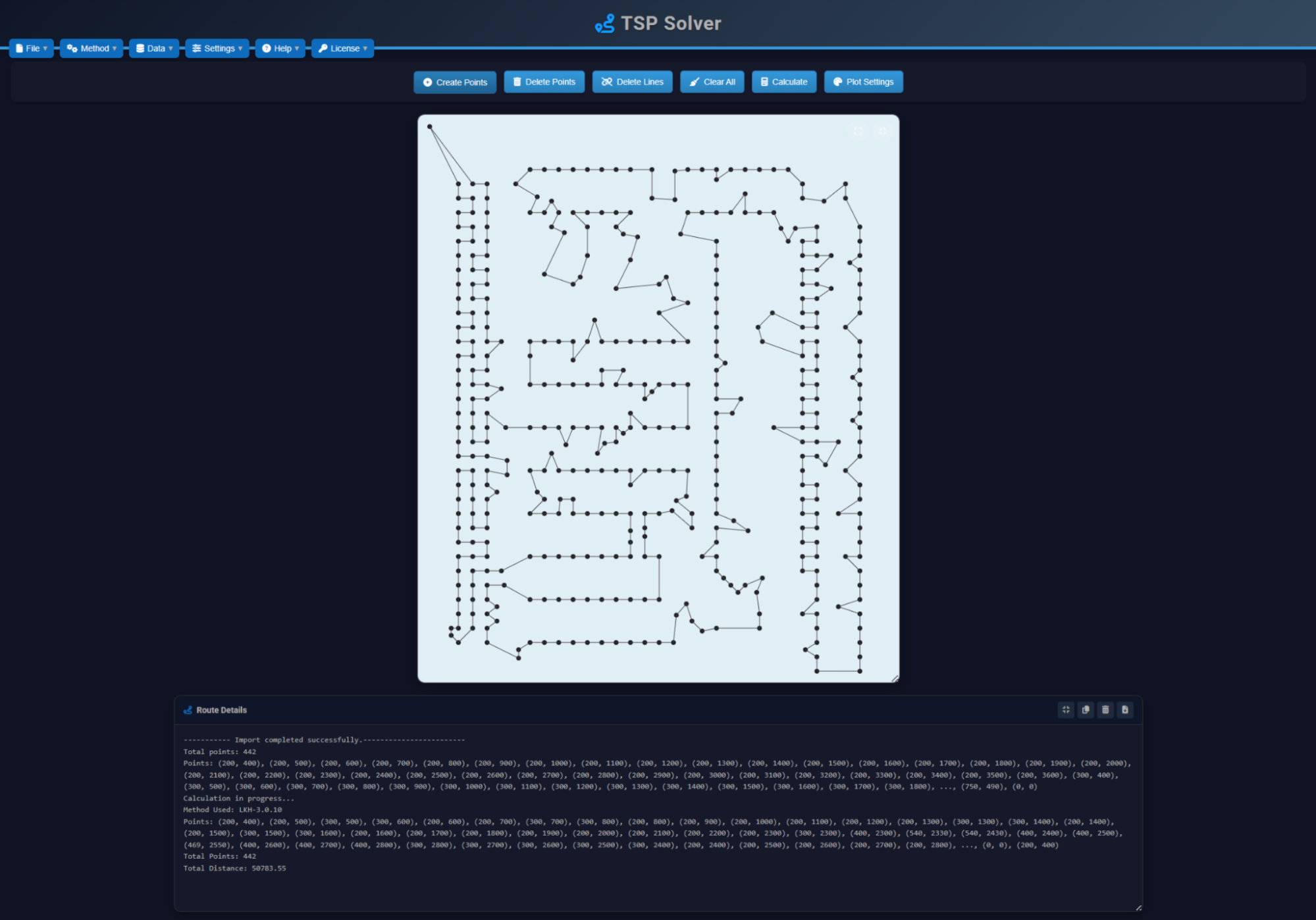
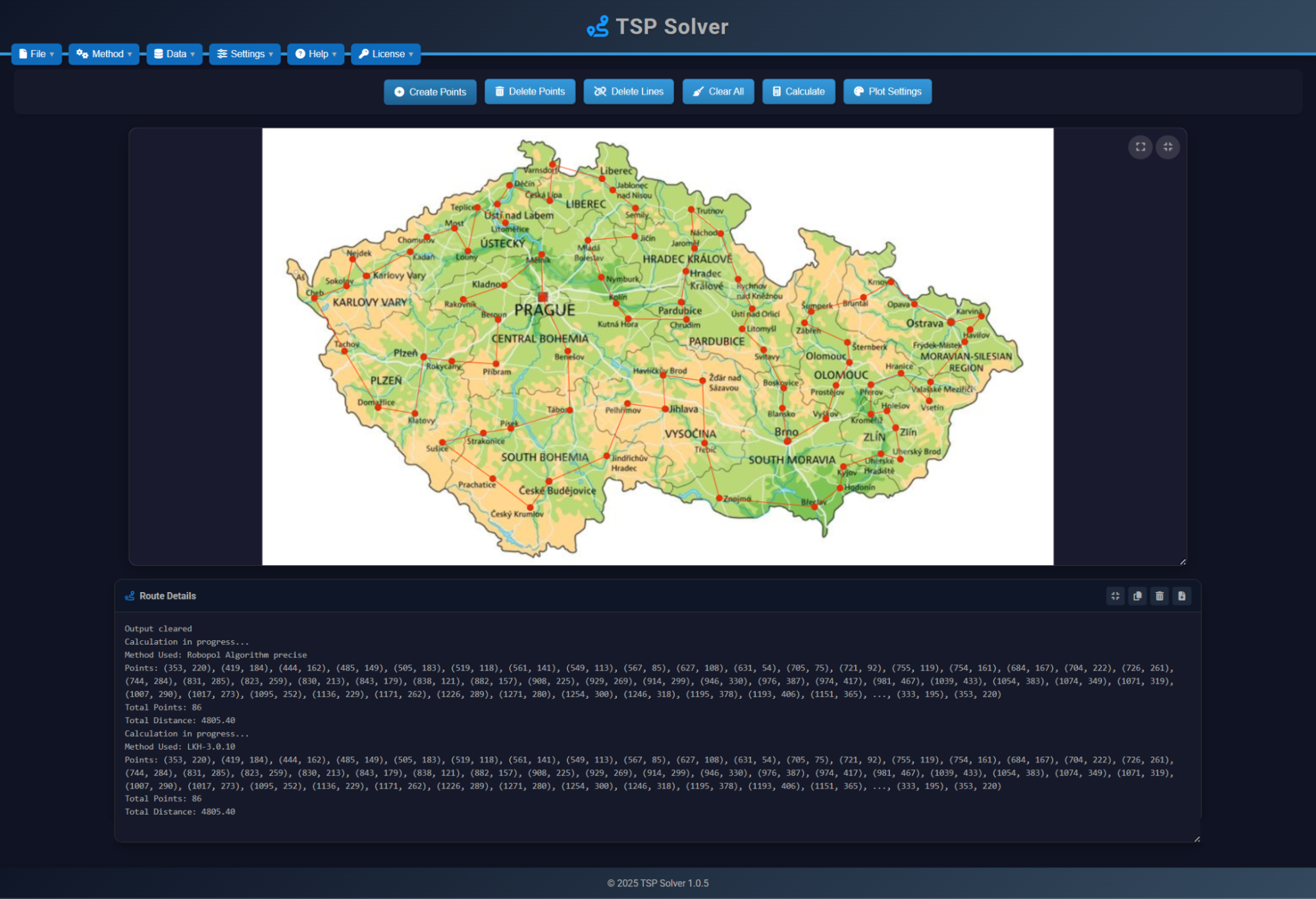
Príklady
Príklad 1 – body na importovanom obrázku
- Importuj obrázok ako šablónu.
- Pridaj štart bod (#1) a ostatné body.
- Nastav farby (Visual Config).
- Vyber metódu (Algorithm) a Calculate.
- Exportuj trasu (obrázok/body/SVG) a ulož projekt (Save As).
Príklad 2 – import bodov z TXT
- Priprav
.txtsúbor so súradnicami. - Dataset → Import Points.
- Vyber metódu a Calculate.
- Exportuj body a ulož projekt (Save As).
Ukážky (klikni pre otvorenie)
Formáty dát
Cestné vzdialenosti & mapy
TSP Art
UI ukážky
Road distance (maps)
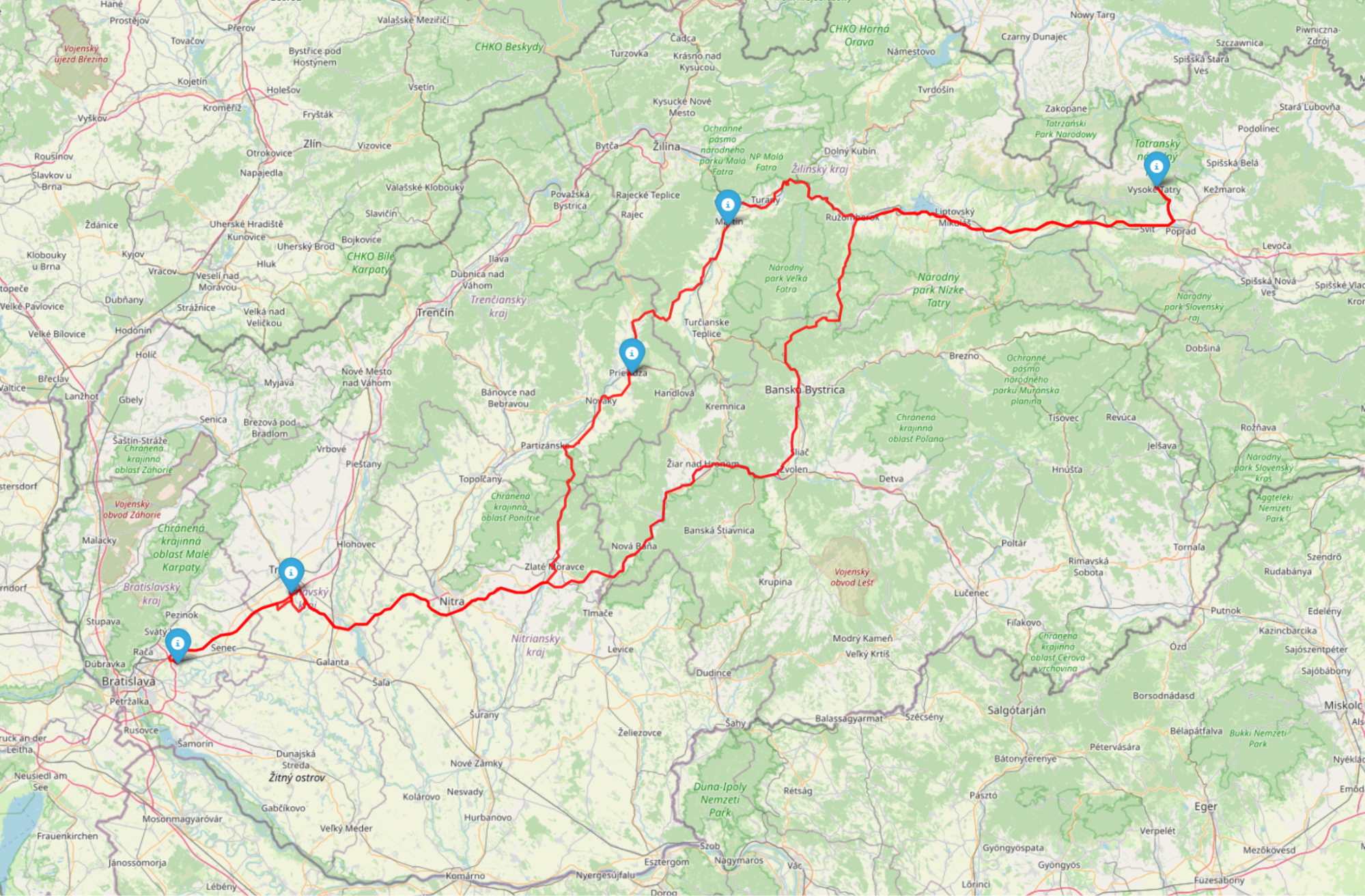
Road mode calculates routes on real road networks (geocoding + routing).
You can also enable Multi-vehicle (mTSP) for Road mode via Method Config → MULTI-VEHICLE / ROAD (LKH) (vehicles, objective, depot, min/max stops). AIR 2D is supported too; AIR 3D should be verified on smaller jobs before larger runs.
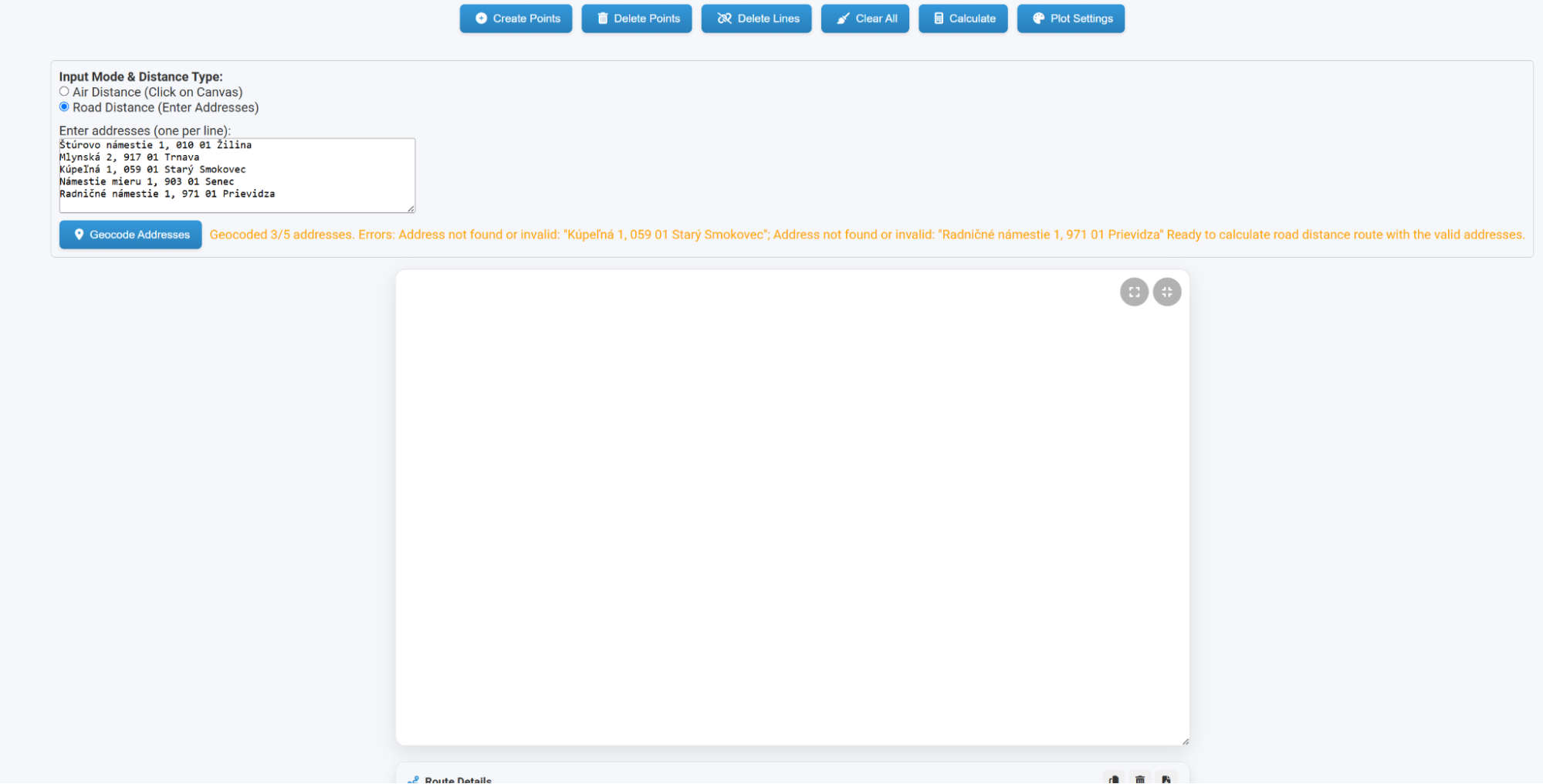
depot_index is the 1-based order of successfully geocoded addresses in your list (1 = first).
Address lines that fail geocoding are skipped (they do not count into the index).
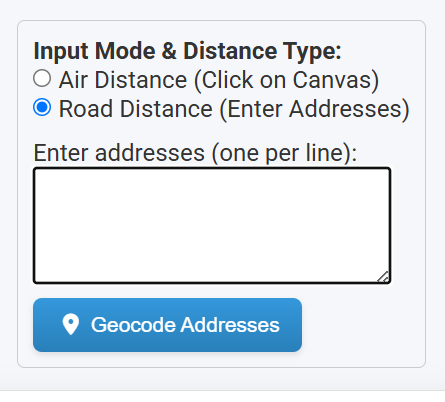
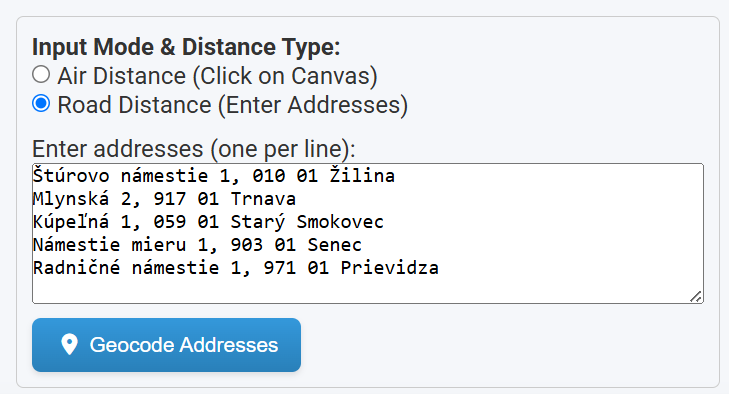
- Select Road Distance.
- Enter addresses (one per line).
- Click Geocode Addresses.
- Click Calculate to compute the route.
- Use Show on Map to open an interactive preview.
- Use GOOGLE MAPS export to open the route in Google Maps (navigation / send to phone).
Cestné vzdialenosti (mapy)
Road režim počíta trasu po reálnej cestnej sieti (geokódovanie + routovanie).
Aj v Road režime vieš zapnúť Multi-vehicle (mTSP) cez Method Config → MULTI-VEHICLE / ROAD (LKH) (vehicles, objective, depot, min/max stops). AIR 2D je podporované tiež; AIR 3D si najprv over na menších úlohách.
depot_index je 1-based poradie úspešne geokódovaných adries v zozname (1 = prvá).
Riadky, ktoré sa negeokódujú, sa preskočia (nezapočítajú sa do indexu).
- Zvoľ Road Distance.
- Zadaj adresy (1 adresa = 1 riadok).
- Klikni Geocode Addresses.
- Klikni Calculate – vypočíta trasu.
- Použi Show on Map na interaktívny náhľad trasy.
- Použi GOOGLE MAPS export – otvorí trasu v Google Maps (navigácia / odoslať do mobilu).
License / editions
Use “Enter license” to activate purchased features. Editions typically differ by point limits, import/export permissions, and road‑route capabilities.
- Demo: limited points/features (intended for evaluation).
- Basic: suitable for smaller projects and travel use cases.
- Professional: full feature set with expanded limits; practical scale depends on hardware, memory, and selected mode.
Licencia / edície
Funkcia “Enter license” aktivuje zakúpené funkcie. Edície sa typicky líšia limitmi bodov, možnosťami import/export a cestnými trasami.
- Demo: obmedzené body/funkcie (na vyskúšanie).
- Basic: vhodné pre menšie projekty a cestovanie.
- Professional: plné funkcie s rozšírenými limitmi; praktický rozsah závisí od hardvéru, pamäte a zvoleného režimu.
System requirements
- Windows 10/11
- Minimum 2 GB RAM
- ~1 GB free disk space
- Screen resolution at least 1024×768
Systémové požiadavky
- Windows 10/11
- Minimálne 2 GB RAM
- ~1 GB voľného miesta na disku
- Rozlíšenie aspoň 1024×768
Notes & tips
- Use complete addresses for better geocoding accuracy (street, number, postal code, city, country).
- For large AIR datasets, start with the Robopol Refined Fast profile and enable Skip Drawing when needed.
- Export SVG for vector editing and clean scaling (Inkscape/Illustrator).
- Decimals must use dot (
.), not comma.
Poznámky a tipy
- Používaj kompletné adresy pre lepšie geokódovanie (ulica, číslo, PSČ, mesto, krajina).
- Pri veľkých AIR datasetoch začni profilom Robopol Refined Fast a podľa potreby zapni Skip Drawing.
- Export SVG je ideálny na ďalšie spracovanie (Inkscape/Illustrator).
- Desatinný oddeľovač je bodka (
.), nie čiarka.